How Creators Should Actually Use AI Video Tools
(Read Only If You Want to Publish Videos Faster Without Becoming Video Editors)

By AI video tools, I always mean tools that help creators generate visuals, captions, or short videos — not full-scale professional video editors.
Every time I open an AI video tool, I feel the same resistance.
Not excitement.
Not curiosity.
Resistance.
Timelines. Presets. Transitions. Export buttons everywhere.
And I always think the same thing:
I didn’t want to learn video editing. I just wanted to post something.
AI video tools are supposed to make things easier. But for a lot of creators, they do the opposite. Instead of helping us publish faster, they add one more thing to figure out.
If you’re a writer, solo creator, or freelancer like me, this usually leads to one of two things:
- You overcomplicate video and burn out
- Or you avoid video entirely, even though you know it matters
For a long time, I thought this meant I was lazy or inconsistent.
But this isn’t a motivation problem. And it’s not a “you need better tools” problem either.
It’s a role problem.
Most creators are using AI video tools as if they’re meant to turn us into video editors.
They’re not. And once you understand the difference, video stops feeling heavy.
The mistake isn’t AI video tools. It’s what we expect from them.
Most AI video tools are built with the same assumption:
that creators want to do everything in one place.
Come up with the idea.
Write the script.
Generate visuals.
Edit the video.
Polish it until it looks “good enough.”
On the surface, that sounds efficient. In real life, it feels heavy.
Not because the tools are bad — but because they quietly turn creators into operators. Suddenly, you’re not thinking about ideas anymore. You’re thinking about settings, layouts, timing, and whether you’re “using the tool properly.”
That mental shift is subtle, but exhausting.
What I’ve noticed is that AI video tools work best when they do less, not more.
The moment they try to replace your whole process, they stop helping.
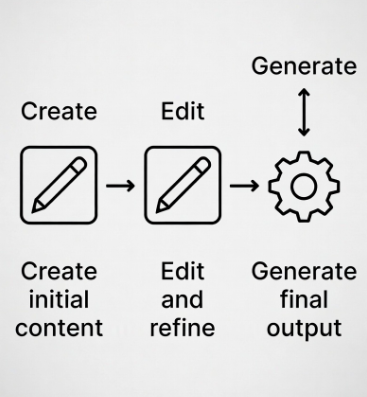
Create. Edit. Generate. These are three different jobs.
A lot of frustration clears up once you separate these three.
Creation is where your thinking happens.
The idea, the angle, the words, the point you’re trying to make.
Generation is where AI is genuinely useful.
Visuals, captions, B-roll, formatting — the repetitive support stuff.
Editing is a different skill entirely.
It needs patience, attention, and a mindset most creators didn’t sign up for.
The trouble starts when everything gets mixed together. When creators try to edit inside tools that were supposed to just assist. Or when they feel guilty for not wanting to learn editing at all.
Here’s the honest line I wish I’d heard earlier:
If you’re touching timelines every day, you’re already doing video editing.
The simplest video workflow that actually stuck for me
I stopped thinking about features and started thinking about friction.
Here’s what finally felt manageable:
- One idea → one clear point
- Write it out first (nothing fancy)
- Add visuals only to support the message
- Post it and move on
That’s it.
Once I stopped trying to “improve” videos after publishing them, things changed. I wasn’t replaying them. I wasn’t fixing tiny details. I wasn’t chasing smooth transitions.
The videos weren’t perfect — but they existed.
And consistency came from that, not from better tools.
Where AI video tools actually help (and where they don’t)
AI video tools are useful — just not in the way they’re often marketed.
They’re great for:
- Turning text into basic visuals
- Adding captions quickly
- Generating B-roll
- Formatting content for different platforms
- Tools like CapCut or simple AI generators are fine when they stay in this role.
Where things go wrong is when you start exploring instead of publishing. Learning every setting feels productive, but most of the time it doesn’t move your content forward.
This took me a while to accept:
Learning a tool is not the same as creating content.
If a tool needs constant tweaking to feel usable, it’s probably doing too much.
Mistakes I see creators make (and have made myself)
- Spending more time editing than thinking
- Chasing “good-looking” videos for everyday posts
- Switching tools every few weeks
- Measuring effort instead of output
Most platforms don’t reward perfection. They reward showing up.
And almost always, consistency beats polish.
You don’t need better videos.
AI video tools aren’t meant to turn creators into editors. They’re meant to remove small obstacles between an idea and publishing it.
When video starts feeling complicated or draining, something’s off. Not with you — but with how the tool is being used.
Keep video simple. Protect your energy. Let AI support the boring parts, not replace your thinking.
If you’re someone whose website feels messy, slow, not converting, or didn’t have a website at all— I help with simple, creator-friendly websites and content that actually work (not complicate it). You can check my work or reach out here
Also, I work with AI tools, platforms, or brands for honest content, reviews, and tutorials. For collaborations, reach me at my email given on my profile.
Comments
Post a Comment